
Seizure Alert – My Medic Watch
My Medic WatchMedical
2.640.00 Reviews
- Version
- S-2.2.11
- Installs
- 10.00K
- Age Rating
- Mature 17+
Screenshots
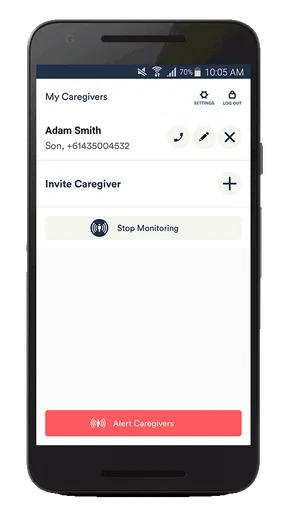
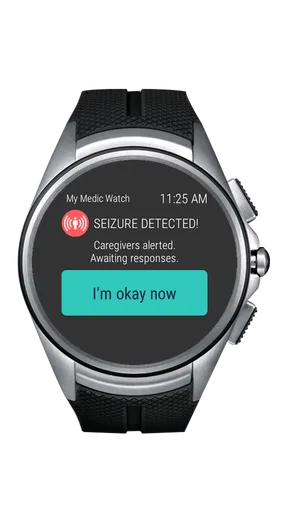
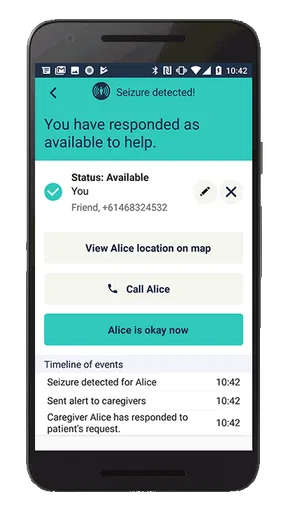
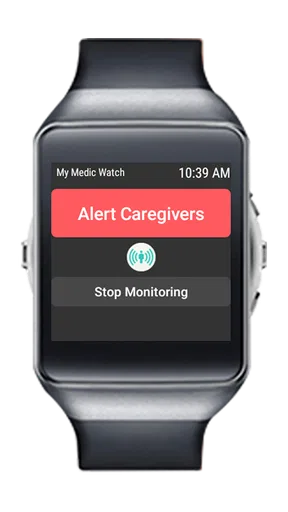
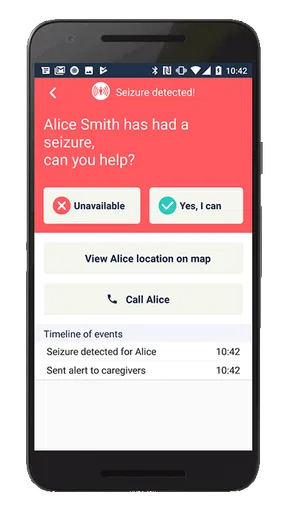
Our Review of Seizure Alert – My Medic Watch
 Analysis by Appyee
When I look at a medical app, I care less about a long feature list and more about whether its central promise makes sense in an ordinary day. Seizure Alert – My Medic Watch focuses on one important job: automatic seizure detection. That narrow purpose is also its biggest responsibility. A tool like this may offer reassurance to a person living with seizures and to the people who support them, but it should never be treated as a replacement for medical advice, a personal safety plan, or emergency care.
I approached this as a practical companion rather than a general wellness app. It belongs to the medical category, is developed by My Medic Watch, and is free to install. The app is aimed at mature users, with a 17+ content rating, which feels appropriate for a product connected to serious health situations. Its current version is S-2.2.11, and the app has passed the ten-thousand-install mark. Those details suggest a real, established product, although its average rating of 2.6 from roughly 150 ratings tells me that the experience has not been consistently smooth for everyone.
Automatic detection is useful only when it fits real life
The appeal is easy to understand. A person may have a seizure while alone, asleep, in the shower, outdoors, or simply away from someone who knows what to do. Automatic detection is intended to reduce the dependence on noticing symptoms and manually asking for help. That is a meaningful difference from a standard reminder app or a simple emergency-contact shortcut.
In my view, the strongest part of the concept is the reduction of the “someone has to notice” problem. A family member might be in another room, a caregiver might be temporarily distracted, or a user might not be able to interact with a phone during an episode. A detection-focused tool tries to create an extra layer of awareness during precisely those moments.
That does not mean every seizure will be identified, or that every alert will be correct. Seizures vary widely, and a phone or wearable-based system has to interpret physical activity in context. I would therefore treat the app as an additional safety signal, not as proof that an event has or has not occurred. The most responsible way to use it is alongside a clinician-approved plan that explains what relatives, carers, or emergency responders should do next.
There is another point that is easy to overlook: detection is not the same as diagnosis. The app’s purpose is to alert around a possible seizure event, not to explain its cause, classify a condition, or replace an appointment with a neurologist. If someone is experiencing new, unexplained, or worsening episodes, the correct next step is professional medical evaluation, regardless of whether the app raises an alert.
What using it practically demands
The first challenge is trust. For an automatic alert system to be useful, I would need to understand how it behaves before relying on it. That means learning how an alert appears, checking which people are expected to respond, and making sure those people know what the notification means. A warning that arrives to an unprepared contact can create confusion instead of help.
I would also build a short testing routine into setup. Rather than waiting for a frightening incident to discover that a phone is muted, disconnected, or out of reach, I would review the complete path with a trusted person. The goal is not to imitate a seizure or make medical claims about testing; it is to confirm that everyone understands the intended response and that the phone is positioned consistently during normal use.
That workflow is one of the more useful insights I take from this kind of app: the technology is only one part of the safety chain. The other parts are the person who receives the alert, the instructions they follow, and the user’s own medical plan. If any link is weak, automatic detection cannot solve the whole problem.
Daily placement matters too. A phone left on a desk while the user moves through the house may not provide the same coverage as a phone carried consistently. Clothing, furniture, charging habits, and the distance between the user and the device can all affect whether an alert is noticed in time. I would avoid promising myself uninterrupted protection and instead decide where the app fits best: at night, during periods alone, while traveling, or during another situation identified with a healthcare professional.
Battery and notification habits deserve attention without turning them into an obsession. Medical alerts are easy to undermine accidentally when a device is silenced, left uncharged, or placed somewhere inaccessible. I would make checking the phone part of the same routine as checking medication supplies or emergency contacts. This is not a glamorous feature, but it is the kind of habit that determines whether a safety tool is dependable in practice.
A realistic day where it can make a difference
Imagine a user spending an afternoon alone at home while a relative is at work. The user keeps the phone with them and has already explained the alert process to that relative. If the app detects a possible seizure, the relative has a clear reason to check in rather than waiting for the user to call. That may shorten the time before someone becomes aware of the situation, particularly if the user cannot make a call personally.
The benefit here is not that the app magically handles the emergency. The benefit is that it can help bridge a gap in awareness. The relative still needs to judge the situation, follow the user’s medical instructions, and seek emergency help when appropriate. A notification can begin that response, but it cannot perform the assessment for them.
Night-time use is another scenario where the idea is compelling. A sleeping user may not be able to report an event, and a nearby family member may not notice immediately. Yet this is also where expectations need the most care. I would not assume that a single app guarantees detection during every sleep-related event. I would discuss the intended use with a clinician and regard the app as one layer in a broader plan rather than a substitute for supervision or medical equipment designed for a specific need.
Travel creates a different trade-off. Being away from familiar support can make automatic alerts feel more valuable, but unfamiliar routines also make it easier to forget charging, carry the phone inconsistently, or leave contacts without useful context. Before traveling, I would tell the people who may receive alerts where I am, what my seizure plan says, and when they should escalate their response. The app can support communication, but it cannot supply the missing context on its own.
Where it differs from ordinary alternatives
The usual alternatives in this category are often manual: a person calls for help, a family member checks at set times, or the user wears a device with a dedicated emergency function. Those approaches can be valuable, but they depend on different things. Manual methods require awareness and the ability to act. Scheduled checks can miss an event between check-ins. Dedicated medical devices may be more suitable for someone whose clinician recommends specialized monitoring, though they may involve a different setup and cost.
This app’s particular strength is its attempt to make detection automatic rather than dependent on pressing a button at the moment symptoms begin. That is especially relevant when a user loses the ability to interact with a phone. Its weakness is the same: automatic interpretation can be imperfect, and the user may have less immediate control over when an alert is triggered.
I would not choose it simply because it is free to install. The app includes in-app purchases ranging from $2.99 to $139.99 per item, so I would inspect the available purchase options carefully before assuming that every part of the experience is included. For a medical product, cost is not a minor detail. A person should know what they can use without payment and what ongoing or optional spending may be involved before building a safety routine around it.
The modest average rating also makes me cautious. A rating of 2.6 is not a verdict on whether automatic detection is valuable, but it is a reason to test the app personally and read current user feedback before depending on it. Ratings can reflect different phones, expectations, support experiences, or reliability concerns, so I would look for patterns rather than focusing on a single complaint or praise.
Small habits that improve the experience
My first practical recommendation is to write down the response plan in plain language. Include who should be contacted, what information they need, and which signs require emergency assistance. The app may help draw attention to an event, but a written plan prevents the alert from becoming an ambiguous message that nobody knows how to handle.
Second, give trusted contacts a low-pressure orientation. They should know that an automatic alert may indicate a possible seizure and that they should respond according to the user’s medical guidance. This avoids two opposite mistakes: ignoring a serious notification because it seems vague, or reacting to every alert with unnecessary panic.
Third, review the setup after changes in routine. A new phone position, a different sleep arrangement, travel, or a change in support contacts can make an old plan less practical. I would treat these changes as prompts to revisit the entire workflow, not merely the app’s settings.
Fourth, keep a separate record of events and symptoms when advised by a healthcare professional. An alert may mark a moment that deserves discussion, but it is not automatically a complete medical record. Notes about circumstances, recovery, medication questions, or witness observations can be more useful during an appointment than relying on memory alone.
Who is likely to gain the most
I see the greatest potential value for people who have a known seizure condition, spend meaningful periods alone, and have trusted contacts able to respond. It may also suit families looking for an additional awareness layer when a loved one cannot reliably call for help during an event. In both cases, the app works best when everyone understands its role and the user’s clinician is part of the broader safety conversation.
It is less suitable for someone seeking a general health tracker, a diagnostic tool, or a guaranteed emergency service. I would also be cautious if the user cannot keep the phone nearby, if no one is available to respond, or if the cost of in-app purchases would make continued use difficult. In those situations, a different arrangement—such as a clinician-recommended device, a formal care plan, or direct supervision—may be more appropriate.
People with unusual movement patterns or conditions that could resemble seizure activity should be especially careful about interpreting alerts. False alarms could worry family members and create unnecessary disruption, while missed events could produce dangerous confidence. That is why I would judge the app by how well it fits an individual medical plan, not by the attractiveness of automatic detection in isolation.
The mature age rating is another reminder that this is not casual software. Conversations about seizures, emergencies, and health data can be difficult, especially for younger users or families. I would involve an appropriate adult and healthcare professional when needed rather than handing the responsibility to the app alone.
My final assessment of the safety promise
My Medic Watch presents a focused idea with genuine practical value: helping create awareness when a person may not be able to report a seizure themselves. In the right household, that extra signal could prompt a faster check-in and make time alone feel less vulnerable. I appreciate that the central capability addresses a real limitation of manual emergency buttons.
At the same time, I would not describe it as a complete safety solution. Its usefulness depends on device habits, alert handling, informed contacts, medical guidance, and realistic expectations about automatic detection. The low average rating means I would test it carefully rather than assuming a seamless experience, and the in-app purchase range means I would review the cost structure before committing to it.
My recommendation is cautious but positive for the right user: consider it as one layer in a seizure-response plan, especially if automatic awareness could help when calling is impossible. Install it with a trusted person involved, establish the response steps, observe how it fits your routine, and keep professional medical advice at the center. If you need guaranteed clinical monitoring or a dedicated emergency system, I would look beyond this app instead of asking it to carry more responsibility than it can reasonably bear.
Verdict
Strengths of Seizure Alert – My Medic Watch
- Wearable-based monitoring can alert contacts when a possible seizure is detected.
- Designed to support independent living for people at risk of seizures.
- Emergency contacts can receive alerts when assistance may be needed.
- May provide reassurance to families and caregivers during daily activities.
- Useful as a supplementary safety tool alongside an existing care plan.
Limitations of Seizure Alert – My Medic Watch
- It cannot guarantee that every seizure will be detected accurately.
- Requires compatible wearable hardware and a properly configured phone.
- Battery life and Bluetooth connectivity can affect alert reliability.
- Some features may require a subscription or additional service costs.
- It should not replace medical advice, supervision, or prescribed seizure treatment.
Other Releases by My Medic Watch
View All
Fall Alert – My Medic Watch
Medical3.1
Similar Picks in This Category
View All
WebMD: Symptom Checker
WebMD, LLC4.1

Microphone Amplifier
DOSA Apps4.2

Anatomy Learning - 3D Anatomy
3D Medical OU4.5

Period Tracker and Calendar
SimpleInnovation4.9

GoodRx: Prescription Coupons
GoodRx4.8

CVS Health
CVS Pharmacy4.5
Frequently Asked Questions
What is Seizure Alert – My Medic Watch designed to do?
Seizure Alert – My Medic Watch is intended to help monitor certain seizure-related events and notify selected contacts when unusual movement or behavior is detected. It can provide useful information during an emergency, especially when the user is alone. However, it should be treated as a supportive monitoring tool rather than a replacement for medical supervision, emergency services, or a doctor’s diagnosis.
How does Seizure Alert – My Medic Watch detect a possible seizure?
The app generally relies on compatible device sensors and monitoring features to identify patterns that may be associated with a seizure or other unusual activity. Detection can depend on the device model, how it is worn, battery level, permissions, and the user’s movements. Because not every seizure looks the same, the app may miss some events or produce false alerts, so users should review its settings and limitations carefully.
Does the app automatically contact emergency services?
Users should not assume that Seizure Alert – My Medic Watch automatically contacts emergency services in every situation. Its alert process may involve notifying caregivers, family members, or other chosen contacts, depending on the configuration and available service features. Before relying on it, carefully check how alerts are delivered, test the contact list, and confirm what recipients are expected to do after receiving a notification.
What permissions and equipment are required to use it?
The exact requirements can vary by version and device, but the app may need permissions for notifications, motion or activity data, Bluetooth, location, and background operation. It may also work with a compatible smartwatch or wearable rather than functioning fully as a phone-only application. Users should check the current Google Play or App Store listing, supported devices, and battery recommendations before downloading.
Is Seizure Alert – My Medic Watch suitable for everyone with epilepsy?
No monitoring application can guarantee detection of every seizure type, and suitability depends on the user’s symptoms, age, device compatibility, and medical needs. Some events may not produce movements that sensors can recognize, while normal activity can trigger an alert. Discuss the app with a healthcare professional, establish a clear response plan with caregivers, and never delay emergency treatment because an alert was not generated.
